Using 3D BIM?
Verify it in
AR – on site, at full scale

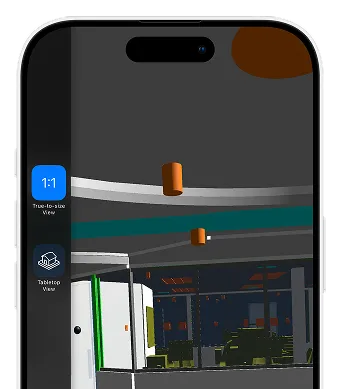
TruScope’s AR add-on brings your building model into the real world: two modes: scaled tabletop for coordination, or full 1:1 scale to walk the space before walls close. Request access to the AR experience and download the app.

No credit card required, 30-day free trial

TruScope AR is an
add-on to TruScope Core.

Available for teams already using TruScope. Priced separately. Contact us for add-on pricing.

WORKFLOW

How TruScope fits
into your inspection workflow

TruScope is designed to fit into how inspections already happen
— without forcing teams to change tools or processes overnight.

*This workflow reduces follow-up, shortens review cycles, and removes the need to reconstruct inspection history later.

Before the inspection

Before the inspection

Load Your Model

Import your Revit or IFC model directly into TruScope. Your building model is now linked to your project and ready to use on site.

During the inspection

During the inspection

Choose Your Mode

Tabletop mode for pre-walk coordination and design review. Full-scale 1:1 mode for on-site spatial verification. Walk the space at actual scale.

After the inspection

After the inspection

Verify On Site

Walk the space with the model overlaid. Confirm spatial relationships, catch clashes early, and document findings directly in TruScope.

Before the inspection

Before the inspection

Load Your Model

Import your Revit or IFC model directly into TruScope. Your building model is now linked to your project and ready to use on site.

During the inspection

During the inspection

Choose Your Mode

Tabletop mode for pre-walk coordination and design review. Full-scale 1:1 mode for on-site spatial verification. Walk the space at actual scale.

After the inspection

After the inspection

Verify On Site

Walk the space with the model overlaid. Confirm spatial relationships, catch clashes early, and document findings directly in TruScope.

← Scroll / Swipe →

*This workflow reduces follow-up, shortens review cycles, and removes the need to reconstruct inspection history later.

Add-On

Take it further with AR.
Walk the model on site, at full scale.

Tabletop Models

Place your building model on any surface in a scaled-down view. Useful for pre-walk coordination, clash detection, and design review on site.

Full Scale 1:1

Walk the space with the AR model overlaid at full scale. See exactly what should be where before the walls go up.

WORKFLOW

Built for teams who need to close
the gap
between model and field.

BIM Engineers

Verify model-to-field accuracy before work is set.

QA/QC Teams

Catch spatial clashes before they become RFIs.

Project Managers

Run owner walkthroughs against the model before handoff.

FAQ

Your Questions. Answered.

Contact us if you have any other questions.
TruScope AR/BIM is an add-on to TruScope that lets construction teams bring their 3D BIM models into the field using augmented reality. Two modes: Tabletop (scaled coordination view) and Full Scale 1:1 (spatial verification at actual scale on site).

It’s an add-on to TruScope Core. You need a TruScope subscription first — AR is an additional tier priced separately. Contact us for add-on pricing.

TruScope AR supports Revit and IFC files, and integrates with Autodesk Construction Cloud. TruScope is an approved Autodesk software.

Tabletop mode places a scaled-down version of your building model on any flat surface — useful for coordination meetings, pre-walk planning, and spatial reviews. Full Scale 1:1 mode overlays the model at actual size in the physical space so you can walk through it, verify placements, and catch clashes on site.

No special hardware required. TruScope AR runs on iPhone and iPad using the device’s built-in camera and ARKit. No headset, no HoloLens, no specialized equipment.

See how AR fits
your project.